
Changing passwords
Set the Dashboard, SSH and IDE passwords through environment variables.
A password that you do not set is generated as a strong random secret. Set your own with Zato_Password before the container starts.
Set a password through an environment variable
Export Zato_Password before you start the container, and the value becomes the password of the Dashboard's admin user as well as the SSH and IDE users:
You can then log in to the Dashboard at http://localhost:8183 with the username admin and the password that you set.
To set each password individually, use the per-account variables - Zato_Dashboard_Password, Zato_SSH_Password and Zato_IDE_Password - all of them are in the environment variables reference.
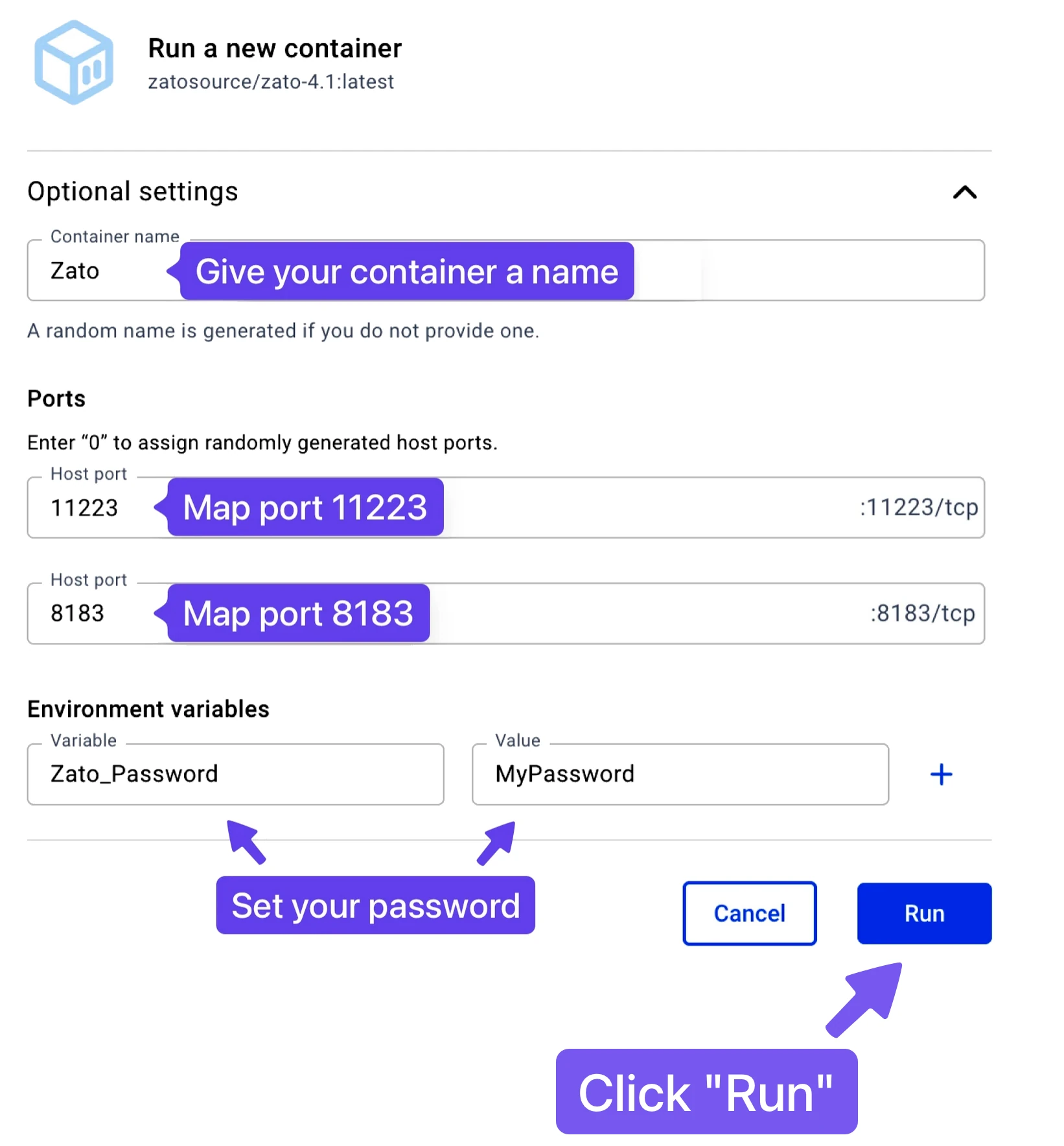
In Docker Desktop, set the variable in the container's start form:
See also
| Page | What it covers |
|---|---|
| Security defaults | The accounts that the passwords belong to |
| Environment variables | Every password variable, with its default and scope |
| Dashboard authentication | How people sign in with the password that you set |