
Channel security
Authenticate every caller before their request reaches your services.
Channels receive all incoming requests and authenticate each caller before the request reaches a service. A channel accepts a caller only when the caller matches the channel's security definition or one of its security groups - a channel with neither is open to anyone who can reach it. Each channel combines its transport details with its authentication: a REST channel, for example, defines the URL path and HTTP methods that it serves along with the credentials that invoking it requires.
A single security definition may cover any number of channels, changes to channels and definitions take effect without restarts, and traffic to a channel can be encrypted - see SSL/TLS.

Use security definitions
A security definition exists independently of channels - you create it first, under the Security menu in the Dashboard, and then assign it when you create or edit a channel of the expected type:
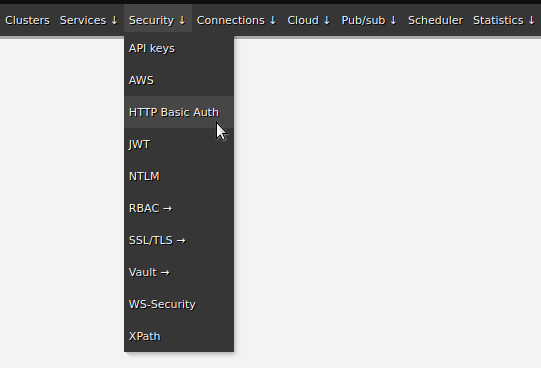


Choose a security type
Five of the seven security types authenticate a caller, and these five are what a channel can use:
| Type | What the caller sends | Use it when |
|---|---|---|
| Basic Auth | A username and password in the Authorization header | The caller is a system you issue credentials to and TLS is on |
| API key | A key in a header, X-API-Key by default | You want per-consumer keys that are easy to issue and revoke |
| Bearer token | An OAuth 2.0 bearer token | The caller already authenticates against an identity provider |
| mTLS | A client certificate | The caller is a system you can issue certificates to, and you want authentication at the transport layer - see mTLS |
| WS-Security | A WS-Security header inside the SOAP envelope | The caller is a SOAP client that expects it |
The remaining two, NTLM and Kerberos (SPNEGO), are how Zato authenticates itself to a remote system. They do not verify who is calling in, so a channel refuses them and the Dashboard does not offer them - see outgoing connections security.
Not every channel type takes every security type:
| Channel type | Basic Auth | API key | Bearer token | mTLS | WS-Security |
|---|---|---|---|---|---|
| REST | Yes | Yes | Yes | Yes | - |
| SOAP | Yes | Yes | Yes | Yes | Yes |
| HL7 MLLP | - | - | - | Yes | - |
| MCP gateways | Yes | Yes | - | - | - |
| Pub/sub | Yes | - | - | - | - |
REST and SOAP channels additionally accept security groups - named sets of Basic Auth, API key and Bearer token definitions assigned to a channel as one unit, so one group covers many consumers and one channel serves many groups. MCP gateways use a separate kind of group, of API key and Basic Auth definitions.
OpenAPI visibility
A channel's security configuration also determines who sees the channel in the OpenAPI console - the OpenAPI document that a caller receives contains only the channels whose security definition is the caller's own or whose security groups include the caller's definition. Inactive channels appear in nobody's document and the console's try-it relay refuses them for everyone. Every REST channel also has an "OpenAPI" checkbox, on by default - turning the checkbox off removes the channel from every document while the channel keeps serving traffic.
Rate limiting and the firewall
You can assign a rate limit to a channel, to its service or to a security definition, and a single limit may name the IP addresses or ranges that it applies to - for example, a channel may limit external users from specific IP ranges to 10,000 requests per day while requests from localhost stay unlimited. For the rules, counters and time ranges, see rate limiting and firewall.
Independently of the limits, the built-in firewall blocks requests for known abusive URL paths before they reach any channel. The paths come from the environment's blocked-paths.txt file, which ships with /.env and takes further entries as needed. The load balancer in front of the servers enforces the list - when a request arrives for a blocked path, the load balancer holds the connection open for 60 seconds and then returns HTTP 403.
Automation with enmasse
The Dashboard is the quickest way to work interactively, and enmasse exports the same objects - security definitions, groups and channels - to YAML that is kept in a repository and imports it from the command line, for repeatable builds.
See also
| Page | What it covers |
|---|---|
| Outgoing connections security | The credentials that Zato presents when it is the caller |
| Security groups | Many consumers on one channel through one named group |
| Rate limiting and firewall | Capping and filtering the traffic that authenticated callers send |