
Single-server environments
One container with the server, dashboard and scheduler - the default production topology.
A single-server environment has one Docker Quickstart container running, with a server, its dashboard and the scheduler, all inside the same container. It is one of the two production topologies, the other being multi-server environments.
When to use single-server environments
Use a single quickstart container when you want a working environment in a few seconds or minutes. It is the first choice unless your installation specifically requires multiple servers.
All components run in the same container, whereas a multi-server environment spreads across multiple containers, possibly across multiple geographic regions.
If you can tolerate the downtime between the primary container going down and a new one spinning up, a single server in a single container is the simplest choice, with the least work required to get it running.
If you need high availability, use a multi-server environment.
A single-server environment using Docker Quickstart
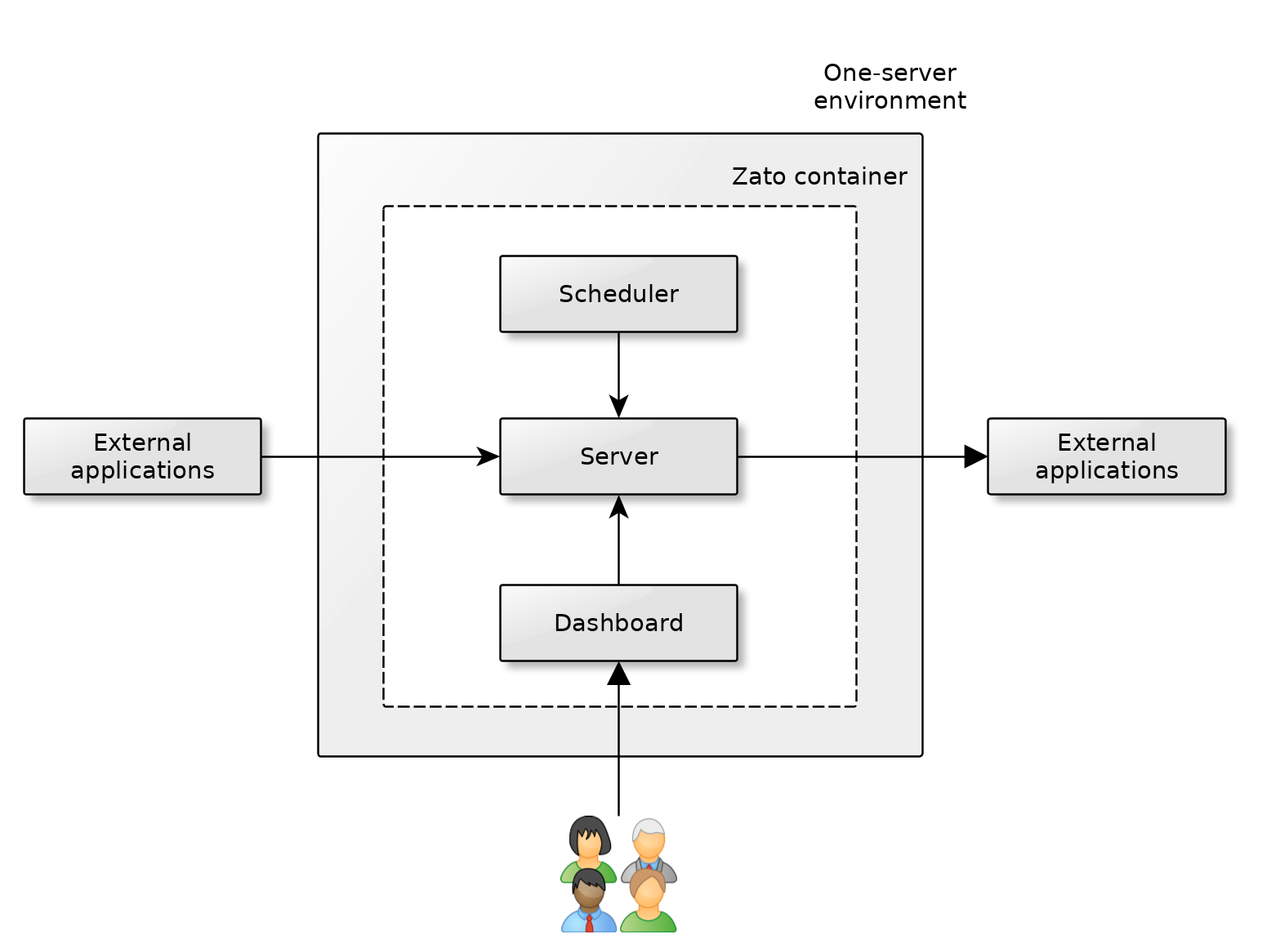
A single quickstart container with one server is the canonical unit of production deployment - multi-server deployments build on what a container of this kind offers.
External applications invoke the container's server through the load-balancer that the container itself runs. SSL/TLS is terminated there: mount your certificate as
zato.pemand the container serves HTTPS on port 11224 - see SSL/TLS. If your organisation terminates TLS centrally instead, on a load-balancer of its own in front of the container, that works equally well, and the two are alternatives rather than layers. Traffic shaping likewise happens before the request reaches the server, either at Zato's own rate limiting or at that external load-balancer.The server offers API services and invokes external applications, as needed in a given project or integration.
The container's scheduler runs in background and it periodically triggers its configured jobs which in turn invoke services from the server. Conversely, the server may need to access the scheduler too, e.g. to change its configuration.
The web-based Dashboard is used by developers and admins to manage the environment in runtime - you can open the TCP traffic to the server and dashboard independently, for instance, to grant access to the dashboard only from specific IP addresses, while letting external applications access only the server. The server uses port 11223 and the dashboard is on port 8183.
There is never any need for external applications to access the scheduler or the Dashboard directly.
All of these components - the server, dashboard and scheduler - are inside the same container and to stop or restart them, use Docker's own commands, e.g.
docker stopordocker run.
How to create single-server environments
Use Docker Quickstart to create your environment. This is a pre-built, always up-to-date image with the extra features that production environments need.
Zato environments can be built with any DevOps, automation and provisioning tools - you can embed the Docker Quickstart image in any containerization product or platform, e.g. Docker Compose or Kubernetes.
Zato environments can be also built in advance, e.g. with Packer, to be deployed with Terraform or other infrastructure-as-code products.
Before the environment takes real traffic, apply the production best practices.
See also
see-also-table
columns: [Feature, What it does]
rows:
  - page: docs/arch/guide/production/multi-server/index
    text: Multi-server environments
    note: Horizontal scaling and high availability behind a load balancer
  - page: docs/admin/guide/install/docker
    text: Docker Quickstart
    note: The image the environment runs on
  - page: docs/admin/production-best-practices
    text: Production best practices
    note: The configuration to apply before real traffic arrives